Images are a fundamental part of digital communications today. Images create first impressions of your business and create trust with your audience regardless of whether they see your brand through a marketplace like Amazon; through a social media ad; as a website banner; or as a product in a print catalog. The quality of the image makes a major difference;, and through image editing, the viewer may be able to view the product in a clean, accurate and good way on any platform.
Clipping path and image masking are two of the most important forms of image editing and because they are so different, it is very common for people to confuse the two. If you are searching for clipping path services, or trying to learn more about image masking, you may be surprised to know that they do not achieve the same result.
In fact, they actually have very different uses/business requirements, and if you use the wrong technique, it will create an image that has unnatural edge quality and loss of information, or that will not pass the required guidelines for use on any platform. With this guide, we explain the two techniques in detail and about the differences and when/how to use them.
What Is a Clipping Path?
A clipping path is a vector-based outline created by drawing around an object with a professional design tool, such as the Pen Tool in Adobe Photoshop. When the path is closed, it determines what will be visible in the image and removes anything outside the created clip path boundary. The benefit of using vectors is they provide sharp, crisp, and clean edges that retain their sharpness regardless of the image’s dimensions or quality.
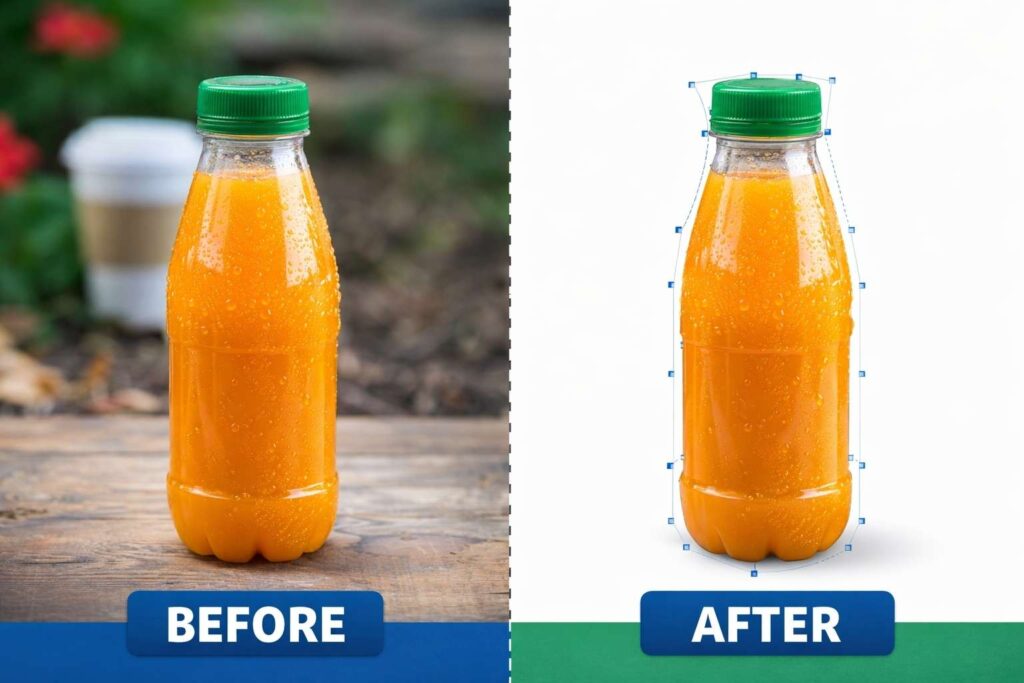
Professional photo-retouching workflows frequently employ clipping paths to create isolated objects that are typically characterized by solid shapes and clearly defined edges. Editors will also carefully trace around the product’s shape so that they can maintain the product’s natural look while removing any distractions or unwanted areas of the image. Creating clipping paths requires a degree of precision and skill and is one of the many reasons why many companies use professional clipping path services instead of relying solely on automated tools for removing backgrounds.
Clipping Paths can be particularly helpful to eCommerce companies and for catalog production. Each Image sold on online shopping sites requires a uniform background, commonly framed in the same way, and free from distractions. A properly done clipping path will enhance visual clarity and offer consistency across all product listings, which aids in building a professional brand identity.
Types of Clipping Paths
Different image complexities require different clipping path approaches:
1. Single Layer Clipping Path
- Drawn as one vector path around a simple object.
- Best for everyday products with clear edges like books, boxes, or electronics.
2. Multi-Layer Clipping Path
- Uses several paths to isolate parts of a subject individually.
- Perfect for objects with multiple components like clothing layers or machinery.
3. Illustrator Clipping Path
- Created in Adobe Illustrator, a vector-based application.
- Offers precise control over anchor points and curves, making it ideal for scalable designs like logos or scalable graphics.
Each type gives designers flexibility based on object complexity and project needs.
What Is Image Masking?
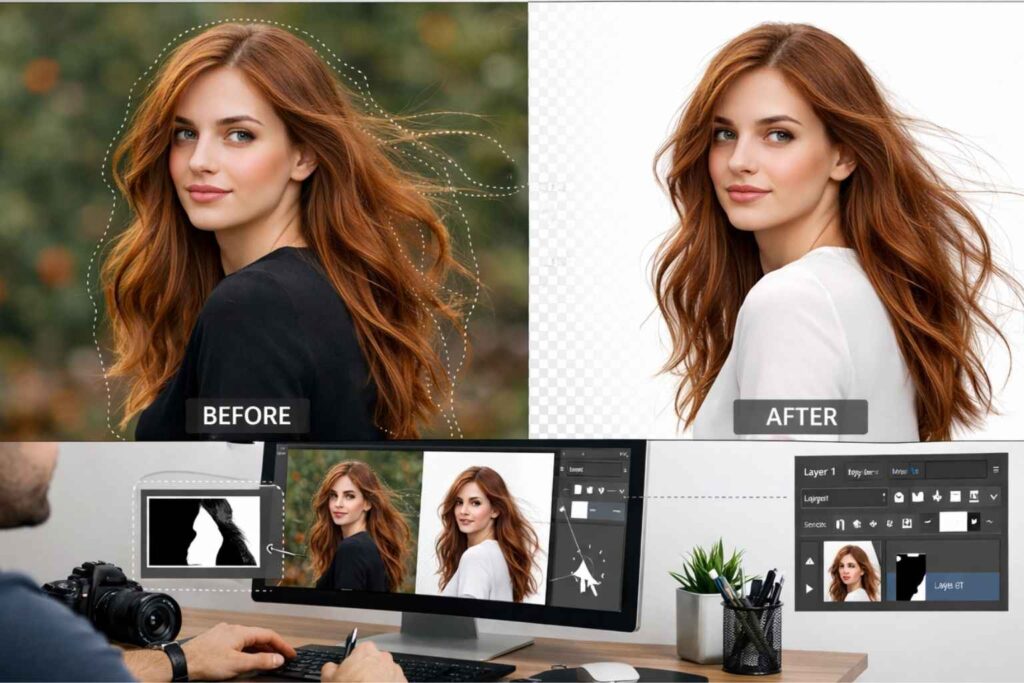
In this Article, we will explain how to use Masking with the Print Command. Masked images provide additional information about the area of the image where the mask will be applied. Masking creates smooth transitions between masked and un-masked images by using grayscale values to determine what area of each pixel should be visible (to the viewer) or invisible (for editing purposes) when a mask is applied to the image.
Images with soft edges, fine detail, or variable transparency are sometimes difficult to work with because of the lack of defined edges, so the artist has to manipulate these edges to get a clean transition from one state to another; thus, successful image masking is necessary.
Oftentimes the areas that a clipping path can accommodate do not provide adequate advantage over the masking process; therefore, masked images are used when the artist wants to achieve the natural look of hair, fur, smoke, shadow, glass, sheer fabric, or transparent materials.
A composite image that looks unnatural because of jagged edges and a lack of texture will have diminished integrity in fashion photography, advertising, and editorial design where realistic appearances are desired. The use of proper masking will create a composite image that gives a sense of depth, continuity and visual balance—thereby helping to develop more believable composites.
Types of Image Masking
Single Layer Clipping Path
The single-layer clipping path technique is ideal for creating an isolated image of an object against its background by utilizing a closed vector between the background and the object. This clipping path type works best for simple products with defined, clear edges and solid surfaces such as boxes, bottles, books, and electronics. Due to its speed, accuracy, and ease of use, single-layer clipping paths are frequently employed in eCommerce for bulk image editing.
Multi-Layer Clipping Path
There are a number of ways you can create a cutting path using the layering technique, which involves creating a number of cutting paths for different elements in the image, and placing the cutting paths separately to allow you to treat them separately when making adjustments such as color correction and adjusting brightness. This is more commonly used with images of clothing, furnishings and items that contain multiple elements. You can use the layering technique for different parts of the same image to give the designer/marketer the ability to edit each element in the same way without editing all elements in the same way.
Illustrator Clipping Path
A clipping path made in Illustrator uses vector shapes only and is created in Adobe Illustrator rather than Photoshop. Typically this type of clipping path will be used for image based prints such as logos, icons, illustrations and graphics. Since Illustrator uses vector shapes for paths, it allows for these types of images to be scaled up or down without losing any image quality. Clipping paths made in Illustrator have very clean and precise edges which makes them ideal for use in branding materials, packaging, and large format printing where quality and scalability are very important.
Clipping Path vs Masking: Key Differences
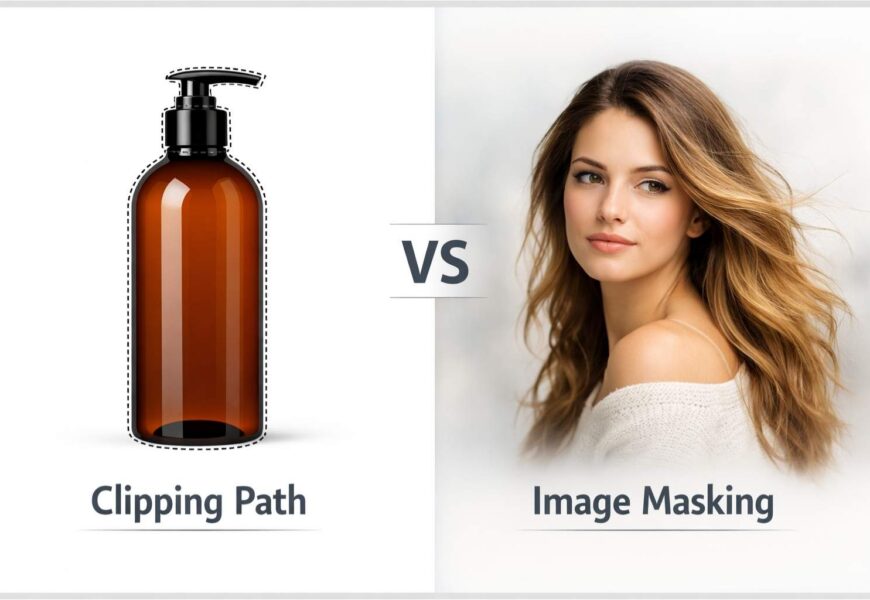
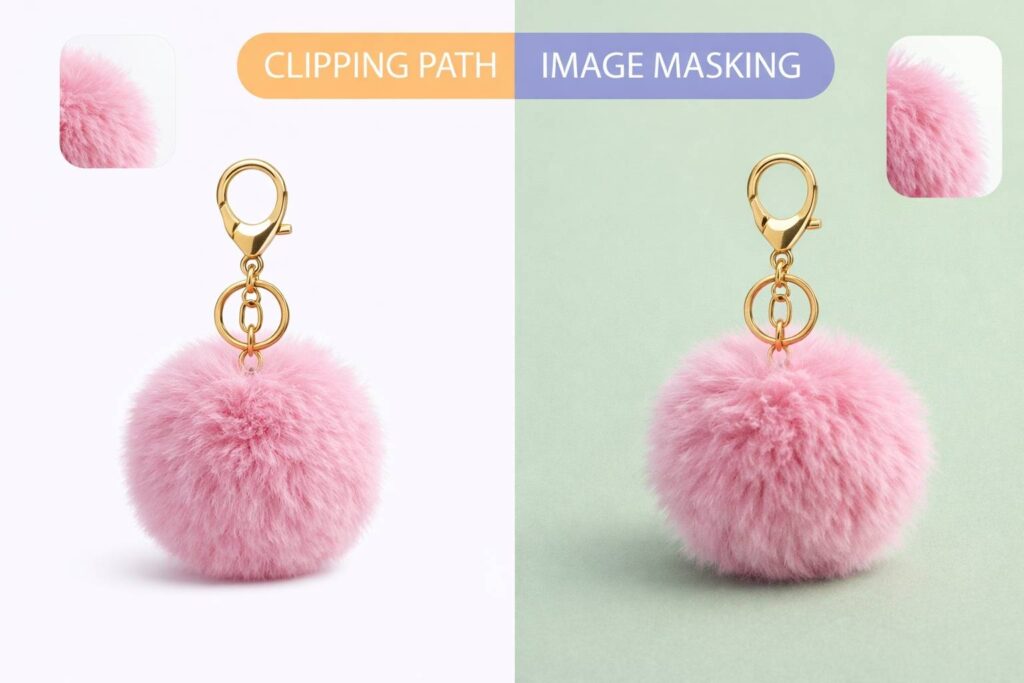
Clipping path and masking techniques are different regarding edge treatment; clipping paths use vector outlines to give clean cut edges, and masking uses pixels to create smooth and natural transitions.
Images with well-defined shapes, such as e-commerce product photography are well suited for clipping path service. In contrast, image masking is necessary for detailed subjects, transparency, or undefined edges.
Clipping path service has limited flexibility when compared to masking service but facilitates greater consistency and efficiency for a structured visual environment; also, because of the flexible nature of masking, this may be more appropriate for an editorial or creative environment wherein blending of value through various degrees of transparency is created gradually over time.
In professional workflows, both techniques are often used together. Editors may apply a clipping path to define the main structure of an object and then refine specific areas with image masking to achieve a realistic finish.
When to Use Clipping Path Services
Clipping path services are ideal for removing backgrounds on images with clear edges and strong consistency across multiple images. This is especially important for e-commerce businesses because clean images and consistency will increase consumer confidence and ultimately increase the conversion rate.
For large volumes of image processing, businesses benefit from using clipping paths as they offer scalability, accuracy, and dependable outcomes. Clipping paths are probably the most common method used by online retailers, catalog designers, and marketing agencies to provide visual consistency in thousands and/or hundreds of product images.
When to Use Image Masking
When dealing with soft edges, transparent items and intricate detail you would use image masking instead of vector paths because a vector path would be too difficult to accurately create an illustration on these types of subjects. Fashion photography, portrait retouching, jewelry objects and creative advertising are common uses for masking to produce realistic visuals.
When masking needs to be used to retain natural shadow or reflection pieces on the edge of the surface, the use of clipping paths alone cannot give the illusion of depth or the realism of masking.
Choosing Between Clipping Path and Masking
When choosing which technique to utilize, it is important to consider your picture’s complexity, purpose, and expected quality. Simple product images designed for use in online listings generally will utilize clipping paths, while more complex and artistic images will benefit from using masking.
Time and money can also influence your choice of how to create your images. Clipping paths are typically faster and less expensive than image masking, which generally takes significantly longer and requires a higher level of skill. If you select the correct method at the beginning, you will avoid having to re-do your work and will result in a higher quality professional product.
Common Mistakes to Avoid in Clipping Path and Image Masking
Even when using the correct technique, mistakes in execution can reduce image quality and affect brand perception. One common issue is relying too heavily on automated tools, which often fail to handle complex edges and fine details accurately. Another mistake is using clipping paths for images that clearly require image masking, such as hair, fur, or transparent materials, resulting in unnatural and harsh edges.
Inconsistent editing across product images is another challenge businesses face. Mixing poorly executed clipping paths with refined masking can make a product catalog look unprofessional and confusing to customers. Proper quality control, experienced editors, and a clear understanding of when to use each technique help ensure visual consistency and professional results across all platforms.
Conclusion
Clipping path services and image masking can each have a defining purpose in professional photo editing, so it’s important to understand how they differ and when each one should be used so that companies can create high-quality visuals and make educated decisions about which one to use.
Using clipping path services is an excellent way to create clean, crisp and accurate product images, while using image masking is the best way to create product images that have a sense of reality, transparency and greater detail retention. Images created using the appropriate technique or a combination of techniques will enhance company credibility across digital and print-based platforms.