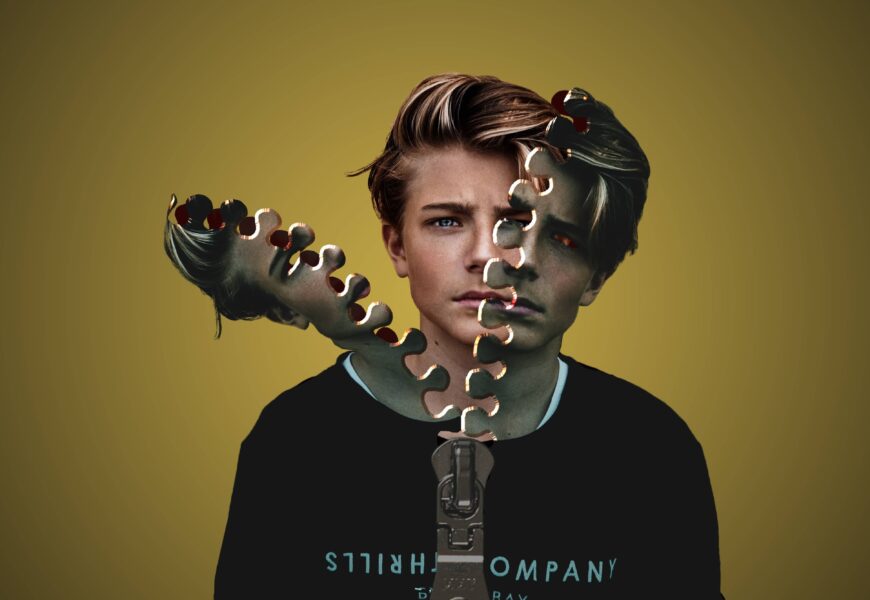
The camera is hailed as an instrument for representing reality. Yet, for imaginative talents, a single image merely serves as the foundation. There is a whole area where technical camera skills merge with the magic of digital art creation, giving room to escape the bounds of the environment to create a world of imagination.
Have you ever come across a spectacular movie poster, a fantastic scene of a fantasy land, or a commercial ad and marveled at the impossible lighting and scale that the artist could achieve? You were seeing the effect of a composite photograph.
In this comprehensive guide, we will go through the fundamental concepts, processes, and philosophies of composite photography.
What is a Composite Photo?
At its most fundamental level, a composite photo is an artwork created by combining two or more separate source images into a single, cohesive visual. Instead of relying on a single click of the shutter to tell an entire story, an artist layers multiple visual elements together.
The primary goal of creating a composite picture can vary wildly depending on the intent of the creator:
- In Commercial Work: It allows products to be displayed in perfect lighting environments that would be impossible or incredibly expensive to build physically in a studio.
- In Fine Art: It serves as a vehicle for surrealism, fantasy, and conceptual storytelling, removing the boundaries of physics and geography.
- In Landscape Work: It helps photographers overcome the technical limits of dynamic range or focus depth, blending exposures to show a scene at its absolute best.
No matter the genre, a successful project hides its own construction. The final image should look as though it occurred naturally during a single moment in time, unless the explicit goal is to create an intentionally surreal abstraction.
The Evolution of Photography Manipulation
It is a common misconception that combining images is a modern phenomenon born out of the invention of computers and editing software like Adobe Photoshop. In reality, the history of photography manipulation dates back to the 19th century.
Early pioneers did not have digital layers or selection brushes. Instead, they relied on physical darkroom techniques to blend different frames.
A Quick Look Through Time
- 1857 (The Darkroom Origins): Oscar Rejlander created the famous piece “The Two Ways of Life” by combining 32 separate negatives into a single, massive print. This was an arduous process of masking out sections of photographic paper and exposing them one by one under an enlarger.
- During the Mid-20th Century (Surrealism & Politics): Artists such as Jerry Uelsmann expanded the limits of fine art by producing smooth, dreamlike prints in the darkroom, eschewing digital technology. Concurrently, news and political entities used rudimentary pasting techniques to alter historical contexts.
- The 1990s to Present (The Digital Revolution): The advent of pixel-based editing software completely revolutionized the craft. What once took days of chemical experimentation in a dark room can now be achieved with non-destructive pixel adjustments, advanced masking algorithms, and precise color grading tools.
Today, photography manipulation has evolved from an experimental fringe technique into an industry-standard practice utilized by millions of creators across the globe.
Technical Pillars of a Seamless Composite Image
The distinction between a non-professional editing and a professionally done composite lies in five main technical components. Whenever there is any inconsistency in these elements in the images you have utilized as references, the human mind will quickly detect the untruth in the amalgamation.
1. Light Direction and Quality
It is the element that joins together all your components. Should your primary component be exposed to direct and intense lighting from the upper-right portion, then it will not be possible for you to incorporate it into a background picture that was taken during an overcast sky. When preparing your materials, make sure that everything matches perfectly.
2. Perspective and Horizon Line
Each and every photograph has its own point of view determined by the position of the camera with respect to the ground. In case your background was captured through a low view looking up, then your foreground object captured through a high view looking down will definitely not match at all. The horizon line is always important when scaling objects to fit within the scene.
3. Edge Contrast and Fringing
When something is extracted from its original setting, the margin where the extraction happens is very fragile. The extraction looks too abrupt as if there were stickers stuck on a sheet of paper. In order to make a clean extraction, professional artists employ sophisticated masking skills to extract complicated margins such as those for hair and fur. They produce the impression of light wrapping.
4. Color Grading and Temperature
A wide range of colors is achieved from different lenses, sensors, and light sources. To ensure the composite image appears authentic, all parts of the image need to go through the process of color grading to bring together all the images and ensure that they belong to the same ambient light source.
5. Resolution and Focal Depth
When the foreground subject becomes crisp and high-resolution, yet the background layer is pixelated and compressed, then the illusion falls flat. Moreover, it is imperative to create an illusion of depth of field. Blurred lenses should be more apparent for objects that are further away from the focal point.
Step-by-Step Blueprint for Creating Photo Composites
The creation of complex composite photography images demands a systematic approach. Jumping into the software with no prior planning will result in frustration and incompatible resources. Utilize this step-by-step guide to create your creative images.
1. Concept and Sketching:
Before reaching for your camera, draw what you would like to create using pen and paper. Determine the placement of light, horizon, and all other necessary ingredients. This plan of action serves as your map through the entire shoot.
2. Asset Acquisition and Shooting:
Wherever possible, take your own source pictures because then you will have full control over the perspective, lens length, and lighting used. However, if you have to work with stock pictures, make sure that the pictures share the same environmental setting.
3. Precise Selection and Masking:
Import the elements to the editing software. Instead of destroying pixels, use non-destructive masks. In the case of geometrical shapes, make use of pen tool; while dealing with difficult texture such as hair, use brushes.
4. Spatial Placement and Scaling:
Arrange your elements into foreground, midground, and background zones. Use transform tools to match the perspective grid of your canvas. Match the black levels of your elements to ensure your deep shadows look uniform across the entire canvas.
5. Atmosphere and Light Integration:
Add environmental effects like fog, dust motes, rain, or sunbeams to physically tie your elements together. Introduce a subtle layer of light wrap around the edges of your subject to embed them naturally into the new background.
6. Global Color Grading and Grain:
Apply unified color adjustments across the entire canvas using adjustment layers. Finally, add a global, subtle layer of digital noise or photographic grain across the image. This texture layer unifies the different source file resolutions into a singular cohesive finish.
Common Creative Styles in Modern Compositing
The application of composite photography stretches across many different creative fields. Understanding these styles can help you identify where your own creative projects fit.
Conceptual and Fine Art
Artists in fine art utilize composite images to show their internal emotions, psychology or even dreams. In such art, physics is totally irrelevant. Their subjects can be floating in mid air, they can be of huge size, and even share an existence with mythical figures. This kind of art is highly dependent on doing perfect photo manipulation.
Commercial and Product Advertising
In the realm of advertisement, efficiency and perfection become the top priorities. Rather than sending the whole production team to shoot a new car at some faraway mountaintop, automotive companies prefer to use a picture of the car taken in a perfect studio environment and then superimpose that car on a great mountaintop shot taken by someone else. This way, perfection is guaranteed in terms of both the picture and its background.
Landscape and Astrophotography
The ethics of compositing in nature photography are frequently called into question by purists, yet it is a very common technique used to compensate for the limitations of physical equipment. Landscape photographers often employ the technique of focus stacking (combining images shot at various focal points for front-to-back clarity) or time blending (combining an image with a sharp foreground shot during the golden hour with a night sky).
Essential Software Tools for the Craft
To successfully manipulate images, you need robust software capable of handling pixel data across layered workflows.
- Adobe Photoshop: The undisputed industry standard for digital manipulation. Its advanced engine, masking capabilities, and massive ecosystem of selection brushes make it the default choice for professional compositors worldwide.
- Affinity Photo: A powerful, cost-effective alternative to the subscription model. It offers incredibly fast performance and robust, non-destructive live filter layers that are perfect for complex compositing.
- GIMP (GNU Image Manipulation Program): A no-cost, open-source option. While its user interface has a steeper learning curve, it possesses all the underlying engine capabilities needed to perform fundamental layer masking, blending, and color matching.
Conclusion: Developing Your Eye
The art of creating composite images requires patience and perseverance. It teaches you to no longer look at images just as products but instead to see them as a combination of light, shade, textures, and edges.
The more you delve into the process of manipulating photographs, you will realize that the techniques merely provide a means to an end of your imagination. When you learn how to merge different worlds seamlessly, the only limit left is that of your imagination.