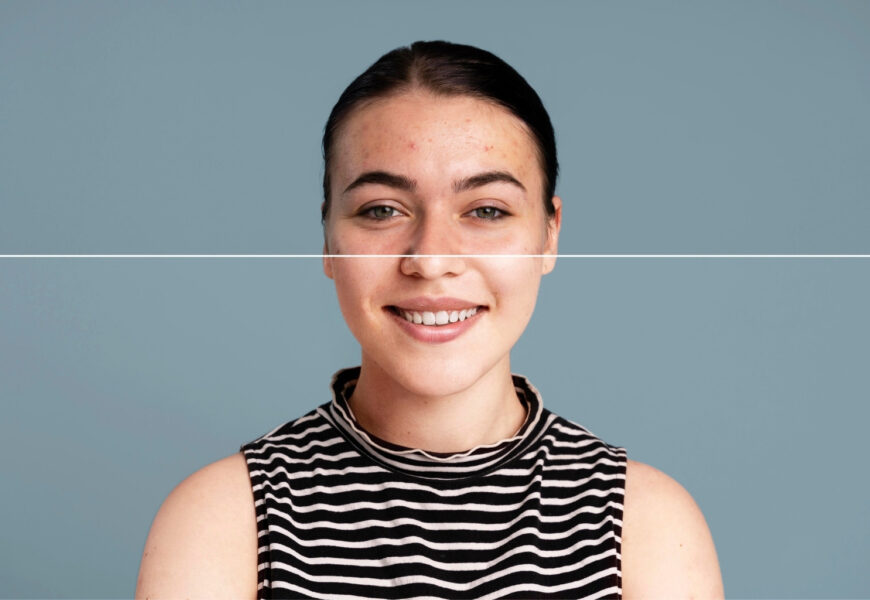
Regardless of whether you’re editing portraits, product pictures, property images, or any other kind of content on social media platforms, you might encounter undesirable shadows in your image, which ruins the whole picture. Knowing how to do photo retouching in Photoshop becomes the most important skill you should possess, as it helps in restoring pictures that otherwise wouldn’t be able to be edited at all.
Lighting conditions are always changeable, especially natural, indoors lighting gives rise to unwanted shadows on faces of your models and product photography tends to create some undesirable dark areas. Nevertheless, there are modern Photoshop features that enable removing these shadows from pictures while preserving realism of your picture.
In this comprehensive guide, you’ll learn professional methods of getting rid of undesirable shadows used by retouchers, find out when using AI tools can be helpful, and find out why photo retouching in Photoshop remains the industry-standard process even in spite of the growing popularity of automated software for editing photographs.
Why Shadows Become a Problem in Photography
Shadows are natural elements in photography, but all shadows don’t necessarily help photographs. While some shadows give mood and depth to a photograph, there are some that hide facial features, mask products, and make colors seem inaccurate. It might be due to the direction of sunlight, incorrect indoor lighting, wrong placement of the flash, and even surrounding objects that create distracting shadows that take focus off the central object.
In portrait photography, shadows are commonly seen below the eyes, nose, chin, or hair line. In product photography, shadows may hide crucial aspects of the product, lower confidence level, and make the product appear small or inconsistent. Window shadows and furniture shadows pose problems for real estate photographers since they make the room seem darker than they really are.
Professional photographers prefer Photo Retouching in Photoshop because it allows total control over the brightness, texture, and color balance.
What Makes Photoshop the Best Choice for Shadow Removal?
While many online editing tools guarantee quick removal of shadows from pictures, Photoshop remains at the top of professional editing due to the fact that it combines AI-powered technology with the ability to do everything manually.
While other applications can simply lighten areas that appear dark, Photoshop enables editors to keep the texture of the skin, make sure that highlights appear realistic, preserve natural color palette, and make edits to the darkened parts only.
These aspects become essential in the sphere of commercial photography where everything has to be accurate. Fashion companies, eCommerce businesses, advertisers, and photographers have to use Photoshop for retouching photographs.
Understanding Different Types of Shadows
In order to edit, it is vital to determine what type of shadow needs to be corrected since each case involves certain nuances.
Facial Shadows
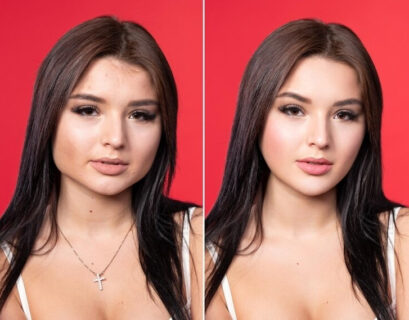
They occur around the eyes, nose, lips, or chin as a result of the way lighting is directed. This shadow makes one look tired, old, or not as lively. Retouching helps to illuminate these areas without spoiling the natural face shape.
Object Shadows
When the objects are located on tables and are being photographed under studio lights, they cast dark shadows. Some shadows are necessary since they create depth, whereas some of them take away the attention from the object itself.
Background Shadows
People positioned next to the wall often cast hard shadows on the background. This makes the picture look amateur and spoils the cleanliness of the photos taken in the studio. Good editing makes it possible to get rid of them without affecting the person.
Environmental Shadows
Outdoor structures like trees, buildings, fences, etc., cause inconsistent lighting. It becomes necessary to remove environmental shadows selectively to preserve realism.
Essential Photoshop Tools Used for Shadow Removal
Professional retouchers rarely rely on a single tool. Instead, they combine several Photoshop features to achieve natural-looking results.
Adjustment Layers
Brightness, Curves, Levels, and Exposure adjustment layers allow editors to lighten only selected portions of an image. Because these edits are non-destructive, adjustments can always be modified later without damaging the original photograph.
Layer Masks
Layer masks make it possible to paint edits onto only the shadowed areas. This prevents over-editing and preserves highlights, ensuring transitions between light and dark remain smooth and believable.
Dodge and Burn
One of the oldest professional retouching techniques, Dodge and Burn selectively lightens or darkens tiny portions of an image. When used carefully, it removes harsh shadows while maintaining realistic skin texture and facial structure.
Clone Stamp and Healing Brush
After shadows are brightened, they sometimes leave uneven textures or color inconsistencies. The Clone Stamp and Healing Brush help blend surrounding pixels seamlessly so the edited region appears untouched.
Camera Raw Filter
The Camera Raw Filter offers advanced controls for Shadows, Blacks, Whites, Texture, Clarity, and Color Balance. These adjustments provide excellent starting points before detailed retouching begins.
Step-by-Step Guide to Remove Shadows Professionally
The process of professional shadow removal involves not only removing all shades but returning the lost details while keeping the natural light balance of the image.
First of all, duplicate the initial image to edit the file without any risks of irreversible damage. Locate the borders of the shadow area and take a look at the adjacent high-lights. Then, create Curves or Exposure Adjustment Layers and use masks for the needed corrections.
Zoom the picture and work on the edges and transitions. Use dodge and burn for minor adjustments and avoid over-brightening. The final step is correcting the color cast caused by the shadow (blue, green, gray).
At the end, check whether the corrected photo differs from the initial one or not. If nobody can distinguish the areas of editing, you have succeeded.
How to Remove Shadow from Picture Without Losing Natural Detail
A lot of beginners wonder about how to remove shadow from picture as automated editing makes an image look very flat. The main problem is that people try to make an entire photo brighter instead of brightening up the shadowed zones only.
The professional approach means working in a gradual way when details are added step by step and skin pores, clothing, hair, and objects are properly restored without damaging natural realistic look.
There is one more important thing that should be kept in mind. It is crucial to equalize the brightness with the surrounding areas instead of making each part equally bright.
Remove Shadow from Photo Using Professional Editing Techniques
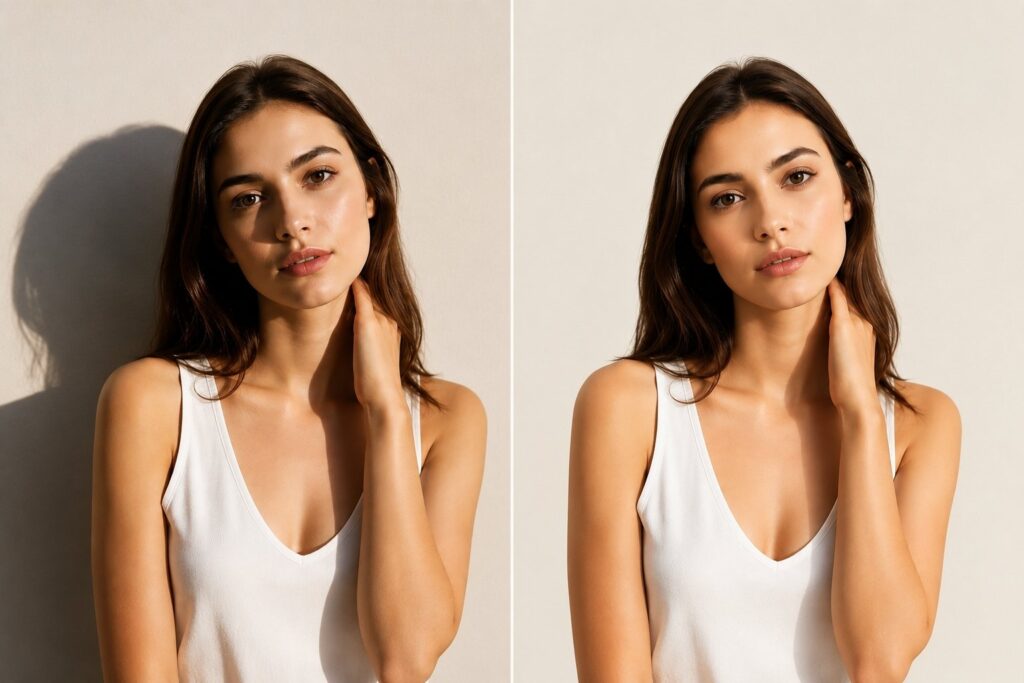
When you want to remove shadow from photo, there are different ways in which you can do this using Photoshop, depending on the complexity of the image.
Portraits will be well suited for dodge editing with frequency separation. For products, curves adjustment along with soft masking is a good technique. With landscapes, you may need selective adjustments to exposure in many areas.
The reflected colors are something that the editor needs to consider, as shadows have cool colors than those around them, therefore color correction becomes as important as brightness adjustment.
Through experience, you will see that removing shadows in an image becomes much more about balancing than anything else.
Can You Rem.
ove Shadow from Photo Online Free?
Many people want to know whether you can remove shadow from photo online for free as the online editors provide ease and time-saving facilities. But such platforms which use AI technology are only capable of enhancing easy photos within a few seconds.
But free online services generally find it hard to deal with complicated shadows, overlapping elements in the photo, textured background, or photos taken commercially. They generally tend to create blurriness in the picture, smoothen faces, and show editing marks in the image.
In case of high-quality photos used for printing, advertisements, or websites, manual photo editing is always more efficient.
AI vs Manual Editing: Which Delivers Better Results?
There has been an impressive advancement in artificial intelligence technology in recent years. AI image editing software is able to detect the presence of faces, objects, and lighting patterns with great accuracy. It saves time in the process by automating tedious edits.
AI technology has not yet gained the capability to tell the difference between intentional dramatic lighting and undesirable dark spots. This may cause an automatic edit to lack the necessary depth of a portrait image or to become unrealistic.
By contrast, Photoshop editing gives experts the chance to choose which shadows have to be left and which removed to achieve the best results. Many people use a combination of the two approaches these days.
Remove Shadows Image for Product Photography
It is understood that the clarity of pictures is vital for businesses offering products online since the picture will influence how much the customers trust the business. It is imperative for one to master the art of shadow removal so that they can ensure that their images meet the requirements of the market.
When there are uneven shadows, the picture can alter the true color of the product being sold. Shadow removal is an editing technique where one removes all unwanted shadows, but retains subtle grounding shadows of the product.
Choosing the Right Shadow Remover Workflow
Every photograph requires a different editing strategy, which is why experienced editors avoid relying on a single preset or filter.
A professional shadow remover workflow begins with analyzing the image. Editors first determine whether the shadow affects exposure, color, texture, or all three. They then apply targeted corrections rather than global adjustments.
Working with separate layers allows every modification to remain reversible, making it easier to refine the final result. This layered approach also ensures that clients can request revisions without starting the editing process from scratch.
Common Mistakes Beginners Make
Many new editors unintentionally create unrealistic images while attempting to remove shadows.
One common mistake is increasing exposure too aggressively, causing highlights to become overexposed while the shadow still appears unnatural. Another issue involves smoothing textures until skin resembles plastic or product surfaces lose important detail.
Some editors also ignore color correction, leaving brightened shadows with blue or gray color casts that immediately reveal manipulation.
Professional retouching focuses on subtle improvements rather than dramatic transformations. Small adjustments almost always produce the most believable results.
Tips for Better Shadow-Free Photography
Although editing is powerful, capturing better images reduces editing time considerably.
Position subjects closer to soft natural light whenever possible. Diffusers, reflectors, and larger light sources create smoother transitions between highlights and shadows. Avoid harsh midday sunlight for portraits because it produces deep facial shadows.
When photographing products, use multiple soft lights or reflectors instead of relying on a single direct light source. Even small lighting improvements can significantly reduce post-processing work.
Combining strong photography techniques with photo retouching in Photoshop creates consistently professional results.
Final Thoughts
Photo retouching is not easy in Photoshop; however, if done correctly, it can bring amazing results. While amateurs just make images brighter, a professional shadow removal procedure will restore all the natural details of the image and improve the lighting conditions.
No matter whether you are going to remove shadow from photo, want to find how to remove shadow from picture, need remove shadow from photo online free service, would like to remove shadows from image, or are looking for the best shadow removal methods, Photoshop is still the most advanced and reliable way to do it professionally.
With time passing, AI technology is getting better, and automated editing is becoming more powerful; however, professional skills will be needed to make your photographs look natural. Using good shooting practices and professional Photoshop editing, you will create unique images that will impress people on the Internet.